Building Production-Ready CI/CD Pipelines with Jenkins
As someone who’s built and maintained CI/CD pipelines at scale, I’ve learned that Jenkins remains one of the most powerful tools for DevOps automation. Let me share what I’ve learned about building production-ready pipelines.
Why Jenkins Still Matters in 2026
Despite the rise of newer CI/CD tools, Jenkins continues to dominate enterprise DevOps for several reasons:
- Flexibility: Jenkins can integrate with virtually any tool in your stack
- Plugin Ecosystem: Over 1800+ plugins for every imaginable use case
- Self-Hosted: Complete control over your infrastructure and data
- Scalability: Can handle thousands of builds across distributed agents
The Anatomy of a Production Pipeline
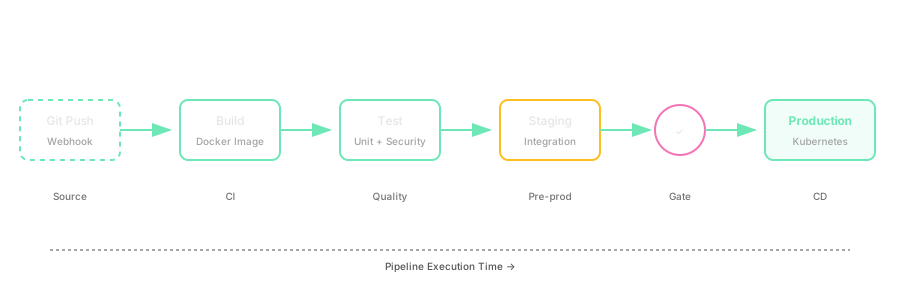
A production-ready Jenkins pipeline should handle:
- Source Control Integration - Automated triggers from Git webhooks
- Build Stage - Compile, test, and package your application
- Testing - Unit tests, integration tests, security scans
- Artifact Management - Store build artifacts securely
- Deployment - Automated deployment to staging/production
- Monitoring - Track pipeline metrics and failures
Building a Real-World Pipeline
Here’s a production pipeline I built for a microservices architecture:
pipeline {
    agent {
        kubernetes {
            yaml """
apiVersion: v1
kind: Pod
spec:
  containers:
  - name: docker
    image: docker:latest
    command:
    - cat
    tty: true
  - name: kubectl
    image: bitnami/kubectl:latest
    command:
    - cat
    tty: true
"""
        }
    }

    environment {
        DOCKER_REGISTRY = 'registry.company.com'
        APP_NAME = 'api-service'
        NAMESPACE = 'production'
    }

    stages {
        stage('Checkout') {
            steps {
                git branch: 'main',
                    url: 'https://github.com/company/api-service.git',
                    credentialsId: 'github-token'
            }
        }

        stage('Build') {
            steps {
                container('docker') {
                    sh '''
                        docker build -t ${DOCKER_REGISTRY}/${APP_NAME}:${BUILD_NUMBER} .
                        docker push ${DOCKER_REGISTRY}/${APP_NAME}:${BUILD_NUMBER}
                    '''
                }
            }
        }

        stage('Test') {
            parallel {
                stage('Unit Tests') {
                    steps {
                        sh 'go test ./...'
                    }
                }
                stage('Security Scan') {
                    steps {
                        sh 'trivy image ${DOCKER_REGISTRY}/${APP_NAME}:${BUILD_NUMBER}'
                    }
                }
            }
        }

        stage('Deploy to Staging') {
            steps {
                container('kubectl') {
                    sh '''
                        kubectl set image deployment/${APP_NAME} \
                            ${APP_NAME}=${DOCKER_REGISTRY}/${APP_NAME}:${BUILD_NUMBER} \
                            -n staging
                        kubectl rollout status deployment/${APP_NAME} -n staging
                    '''
                }
            }
        }

        stage('Integration Tests') {
            steps {
                sh 'npm run test:integration'
            }
        }

        stage('Deploy to Production') {
            when {
                branch 'main'
            }
            steps {
                input message: 'Deploy to production?', ok: 'Deploy'
                container('kubectl') {
                    sh '''
                        kubectl set image deployment/${APP_NAME} \
                            ${APP_NAME}=${DOCKER_REGISTRY}/${APP_NAME}:${BUILD_NUMBER} \
                            -n production
                        kubectl rollout status deployment/${APP_NAME} -n production
                    '''
                }
            }
        }
    }

    post {
        success {
            slackSend(
                color: 'good',
                message: "Pipeline succeeded: ${env.JOB_NAME} #${env.BUILD_NUMBER}"
            )
        }
        failure {
            slackSend(
                color: 'danger',
                message: "Pipeline failed: ${env.JOB_NAME} #${env.BUILD_NUMBER}"
            )
        }
    }
}
Key Lessons from Production
1. Use Declarative Pipelines
Declarative syntax is more maintainable and easier to understand than scripted pipelines. It enforces best practices and provides better validation.
2. Containerize Your Build Agents
Running Jenkins agents in Kubernetes pods ensures:
- Consistent build environments
- Resource isolation
- Automatic scaling based on demand
- Cost efficiency (agents spin up/down as needed)
3. Implement Proper Secret Management
Never hardcode secrets in your Jenkinsfile. Use Jenkins credentials store or external secret managers like HashiCorp Vault:
withCredentials([string(credentialsId: 'api-key', variable: 'API_KEY')]) {
    sh 'curl -H "Authorization: Bearer $API_KEY" ...'
}
4. Parallelize Where Possible
Running tests in parallel can dramatically reduce pipeline execution time:
stage('Tests') {
    parallel {
        stage('Unit') { steps { sh 'make test-unit' } }
        stage('Integration') { steps { sh 'make test-integration' } }
        stage('E2E') { steps { sh 'make test-e2e' } }
        stage('Security') { steps { sh 'make test-security' } }
    }
}
5. Implement Pipeline as Code
Store your Jenkinsfiles in version control alongside your application code. This enables:
- Code review for pipeline changes
- Rollback capabilities
- Branch-specific pipeline configurations
Performance Optimization
For high-volume pipelines, optimization is crucial:
- Caching: Use Docker layer caching and dependency caching
- Incremental Builds: Only rebuild what changed
- Agent Pools: Use specialized agents for specific tasks
- Artifact Cleanup: Implement retention policies
Monitoring and Observability
Integrate your pipelines with observability tools:
- Prometheus: Track build metrics, success rates, duration
- Grafana: Visualize pipeline performance over time
- ELK Stack: Centralized logging for debugging failures
Common Pitfalls to Avoid
- Bloated Pipelines: Keep stages focused and modular
- No Rollback Strategy: Always have a way to revert deployments
- Ignoring Failed Tests: Failed tests should block deployments
- Poor Error Handling: Implement comprehensive error handling and notifications
Conclusion
Building production-ready CI/CD pipelines is an art that requires balancing automation, reliability, and speed. Jenkins provides the flexibility to create pipelines that match your exact needs.
The key is to start simple, iterate based on real-world usage, and continuously optimize. Your pipeline should be treated as critical infrastructure—version controlled, tested, and monitored just like your application code.
This is part of my DevOps series. Follow for more posts on infrastructure, automation, and systems engineering.