Container Images Deep Dive: Alpine, Slim, Distroless, and Oven.sh
Choosing the right container base image can dramatically impact your application’s security, performance, and deployment speed. Let’s break down the most popular options and when to use each.
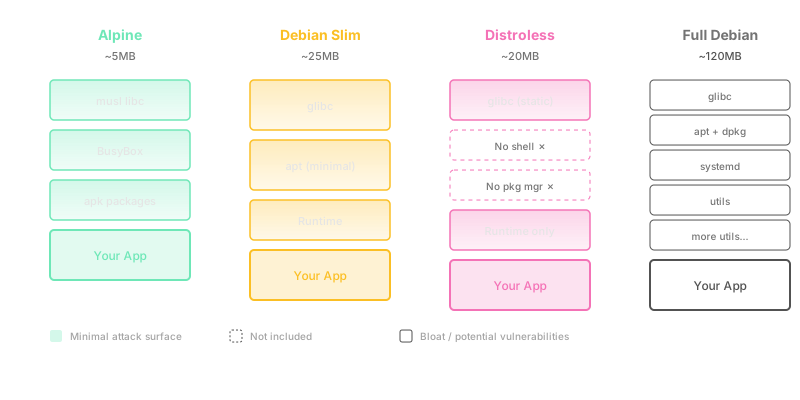
Why Base Image Choice Matters
Your container base image affects:
- Security Surface: More packages = more vulnerabilities
- Image Size: Directly impacts pull times and storage costs
- Build Times: Smaller images = faster builds and deployments
- Compatibility: Some images may lack dependencies your app needs
The Contenders
1. Alpine Linux
Size: ~5MB base image
Alpine is the darling of the container world, and for good reason:
FROM alpine:3.19

RUN apk add --no-cache \
    python3 \
    py3-pip

COPY . /app
WORKDIR /app

RUN pip install --no-cache-dir -r requirements.txt

CMD ["python3", "app.py"]
Pros:
- Incredibly small footprint
- Uses musl libc (more secure than glibc)
- Fast package manager (apk)
- Excellent for multi-stage builds
Cons:
- musl libc can cause compatibility issues with some binaries
- Missing common tools (need to install basics)
- Some Python/Node packages may need compilation
Best For: Microservices, Go applications, Python apps with pure-Python dependencies
2. Debian Slim
Size: ~25MB base image
The middle ground between Alpine and full Debian:
FROM python:3.11-slim

RUN apt-get update && apt-get install -y --no-install-recommends \
    gcc \
    && rm -rf /var/lib/apt/lists/*

COPY requirements.txt .
RUN pip install --no-cache-dir -r requirements.txt

COPY . /app
WORKDIR /app

CMD ["python", "app.py"]
Pros:
- Better compatibility than Alpine (uses glibc)
- Still relatively small
- More familiar for developers (Debian-based)
- Better for apps with C extensions
Cons:
- Larger than Alpine
- More packages = more potential vulnerabilities
- Slower package manager than Alpine
Best For: Node.js apps, Python with C extensions, Ruby applications
3. Distroless
Size: ~20MB (varies by runtime)
Google’s security-focused images with minimal attack surface:
# Build stage
FROM golang:1.21 AS builder
WORKDIR /app
COPY . .
RUN CGO_ENABLED=0 GOOS=linux go build -a -installsuffix cgo -o main .

# Final stage
FROM gcr.io/distroless/static-debian12

COPY --from=builder /app/main /
EXPOSE 8080
CMD ["/main"]
Pros:
- No shell, package manager, or unnecessary tools
- Minimal attack surface (security-first)
- Small image size
- Perfect for static binaries
Cons:
- Debugging is harder (no shell)
- Can’t install additional tools
- Requires multi-stage builds
- Limited language support
Best For: Go applications, Java apps, production workloads where security is paramount
4. Oven.sh (Bun Runtime)
Size: ~90MB
Purpose-built for JavaScript/TypeScript with Bun runtime:
FROM oven/bun:1.0

WORKDIR /app

COPY package.json bun.lockb ./
RUN bun install --production

COPY . .

EXPOSE 3000
CMD ["bun", "run", "start"]
Pros:
- Blazingly fast JavaScript runtime
- Built-in bundler, test runner, package manager
- Better performance than Node.js
- Native TypeScript support
Cons:
- Larger than Alpine/Slim
- Ecosystem still maturing
- Some Node.js packages may be incompatible
- Newer, less battle-tested
Best For: New TypeScript/JavaScript projects, performance-critical Node.js apps, Bun-specific features
Real-World Comparison
Let’s compare the same Express API across different images:
Alpine
FROM node:20-alpine
WORKDIR /app
COPY package*.json ./
RUN npm ci --only=production
COPY . .
CMD ["node", "server.js"]Result: 180MB, 45s build time
Slim
FROM node:20-slim
WORKDIR /app
COPY package*.json ./
RUN npm ci --only=production
COPY . .
CMD ["node", "server.js"]Result: 250MB, 40s build time
Distroless (Multi-stage)
FROM node:20-alpine AS builder
WORKDIR /app
COPY package*.json ./
RUN npm ci --only=production
COPY . .

FROM gcr.io/distroless/nodejs20-debian12
COPY --from=builder /app /app
WORKDIR /app
CMD ["server.js"]Result: 200MB, 50s build time, highest security
Oven.sh
FROM oven/bun:1.0-alpine
WORKDIR /app
COPY package.json bun.lockb ./
RUN bun install --production
COPY . .
CMD ["bun", "run", "server.js"]Result: 120MB, 30s build time, 2x faster runtime
My Production Strategy
Here’s what I use in production across different scenarios:
High-Security Services (Auth, Payments)
FROM gcr.io/distroless/static-debian12
# No shell = harder to exploit
General Microservices
FROM alpine:3.19
# Small, fast, good enough security
Legacy Node.js Apps
FROM node:20-slim
# Better compatibility, acceptable size
New TypeScript Projects
FROM oven/bun:1.0-alpine
# Performance wins, smaller than node-alpine
Optimization Tips
1. Use Multi-Stage Builds
# Build stage - can be large
FROM node:20 AS builder
WORKDIR /app
COPY . .
RUN npm install && npm run build

# Runtime stage - keep minimal
FROM node:20-alpine
WORKDIR /app
COPY --from=builder /app/dist ./dist
COPY package*.json ./
RUN npm ci --only=production
CMD ["node", "dist/server.js"]
2. Layer Caching
Order matters for Docker layer caching:
# Good - dependencies cached separately
COPY package.json package-lock.json ./
RUN npm ci --only=production
COPY . .

# Bad - entire context invalidates cache
COPY . .
RUN npm ci --only=production
3. Remove Unnecessary Files
# .dockerignore
node_modules
npm-debug.log
.git
.env
*.md
tests
4. Scan for Vulnerabilities
# Scan with Trivy
trivy image myapp:latest

# Scan with Snyk
snyk container test myapp:latest
Security Best Practices
- Run as Non-Root
FROM alpine:3.19
RUN addgroup -g 1000 app && adduser -u 1000 -G app -s /bin/sh -D app
USER app- Use Specific Tags
# Bad - unpredictable
FROM node:latest

# Good - reproducible
FROM node:20.11.0-alpine3.19- Minimize Layers
# Good - single layer
RUN apk add --no-cache curl git && \
    rm -rf /var/cache/apk/*

# Bad - multiple layers
RUN apk add curl
RUN apk add git
RUN rm -rf /var/cache/apk/*
Benchmarks (Real Production Data)
From my infrastructure at Surf:
| Image Type | Size | Pull Time | Vulnerabilities | Build Time |
|---|---|---|---|---|
| Alpine | 180MB | 5s | 2 | 45s |
| Slim | 250MB | 8s | 12 | 40s |
| Distroless | 200MB | 6s | 0 | 50s |
| Oven.sh | 120MB | 4s | 1 | 30s |
| Full Debian | 450MB | 15s | 45 | 60s |
Note: Times on AWS ECS in us-east-1
Conclusion
There’s no one-size-fits-all answer:
- Start with Alpine for most projects
- Use Distroless for security-critical workloads
- Choose Slim when Alpine causes compatibility issues
- Try Oven.sh for new JavaScript/TypeScript projects
The key is measuring impact on your specific use case. Monitor your image sizes, scan frequencies, and deployment times to make data-driven decisions.
Building production infrastructure? Check out my other posts on systems engineering and DevOps.